 CrackMac
Thank you.
Your receipt is on its way from Paddle, our payment partner. Here's CrackMac — and the three things to do once it's downloaded.
Your download link is in the email we sent when you bought CrackMac. It never expires, and it arrives as soon as your payment is confirmed, which can take a few minutes. Don't have it? Use the form further down and we'll send it again.
Coming from the free trial? macOS remembers the trial's Accessibility permission, not the full app's. Until you redo it once, the full version looks as if it isn't working. It is; it just isn't allowed to move anything yet.
- Quit the trial: menu bar icon → Quit CrackMac.
- Drag the full CrackMac into Applications and choose Replace.
- System Settings → Privacy & Security → Accessibility: select CrackMac and remove it with −.
- Open CrackMac. When it asks, switch it back on (or add it with +). Your dead-zone settings are kept.
Installing
Open the disk image and drag CrackMac into Applications, like any Mac app. Then, the first time you open it:
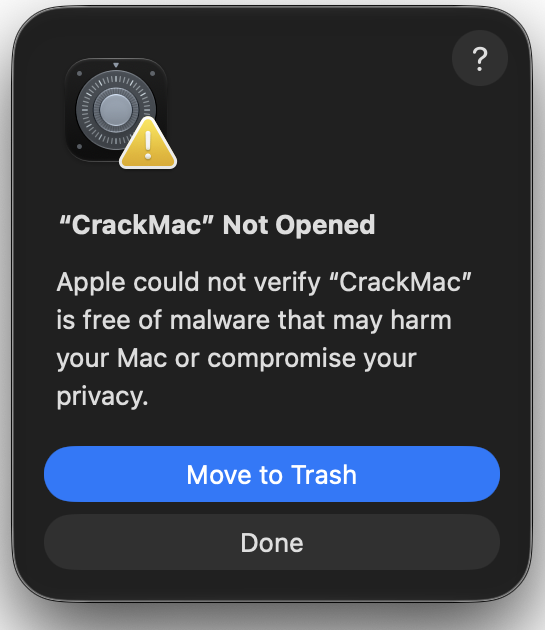
macOS says it can't verify CrackMac. Click Done.
Not Move to Trash. macOS shows it because CrackMac isn't signed with an Apple Developer ID or notarised yet, so Apple hasn't scanned it. It doesn't mean Apple found a problem. Clicking Done keeps the app where it is and tells macOS you tried.
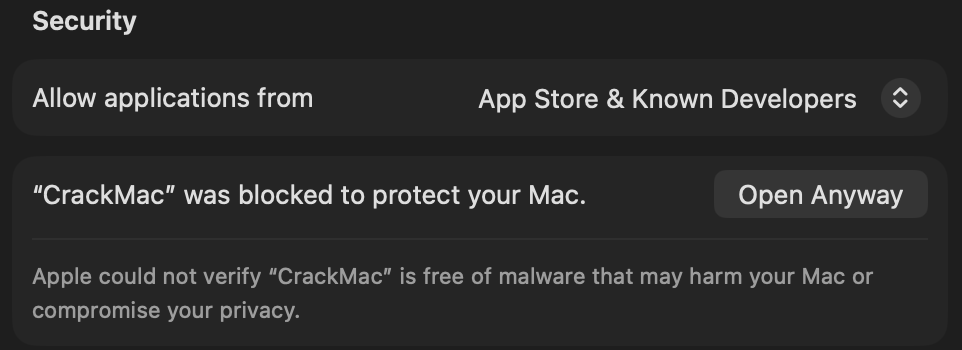
System Settings → Privacy & Security → Open Anyway.
Scroll to the Security section. You'll see the row below. Click Open Anyway, enter your password, then click Open on the final dialog. macOS won't ask again.
Turn on Accessibility when it asks.
CrackMac moves windows and reads menus through this permission. It opens the right pane for you; switch CrackMac on. Then draw your dead zone in CrackMac's settings and you're done.
After every update, macOS quietly drops this permission even though the switch still looks on. CrackMac will tell you when that happens: remove CrackMac from the Accessibility list with “−” and add it again with “+”.

Lost your download link?
Enter the email address you bought with and we'll send it again.
If anything's off
Write to support@crackmac.lol with what you're seeing. And if it doesn't do what you needed, the refund policy is seven days no questions asked, thirty if it doesn't work on your Mac.